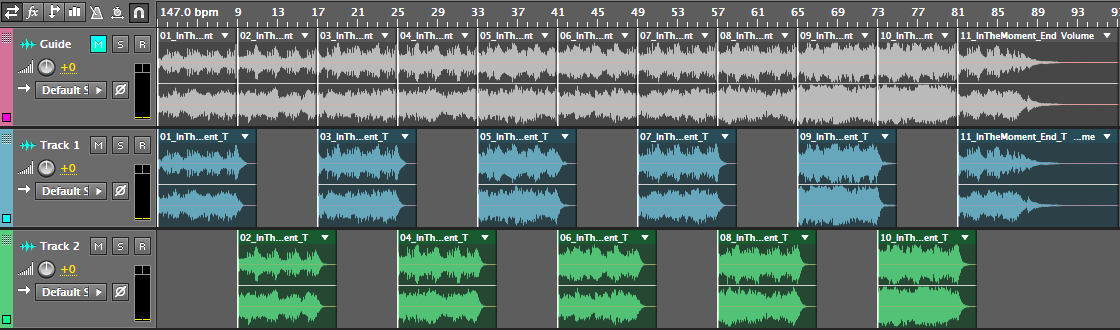
Music Kits are modular, drag-and-drop music tracks made of individual song sections (intro, verse, chorus, etc.) that you can arrange directly in your editing software — no mixing, trimming, or fading required.
Unlike standard fixed-length tracks, Music Kits give you full control to build a soundtrack that fits your project's exact timing, with clean transitions and natural endings built in.
Works with any software — whether you're editing in Final Cut, Adobe Premiere, After Effects, or Garageband, Music Kits aren't tied to a specific tool. Just drag, drop, and rearrange the sections directly on your timeline.
How do Music Kits work?
Every Music Kit includes two matching versions of each song section:
- With tails — includes the natural, full-length ending of the audio.
- Without tails — trimmed cleanly on the beat, with no natural ending.
A "tail" is simply the time it takes for the audio to fade out naturally after the final note. The "with tails" versions are what you'll use in your final arrangement for seamless transitions. The "without tails" versions are designed for quickly snapping together a rough guide track — especially useful if your editing software doesn't support tempo grids or beat-snapping.
Once your guide track arrangement feels right, swap in the matching "with tails" sections to create your final, seamless piece of music.
How do I arrange a Music Kit in 3 steps?
- Snap together a guide track using the "without tails" sections.
- Swap in the matching "with tails" sections (tip: use at least 2 audio tracks so sections can overlap smoothly).
- Mute or remove the original guide track.
That's it — no additional mixing, editing, or fading needed.
Using software with tempo-grid or snapping support? You can skip Step 1 entirely — just set your software's tempo to match the Music Kit, and arrange the "with tails" sections directly using the built-in tempo guides.